远方不远
远方不远
Hello, LuaLaTeX!

注册于 2年前

回答
32
文章
0
关注者
0

你的问题描述以及提供的 mwe 都有些复杂,我大概认为你需要:

  1. 文档的各级标题的标题名虽然采用英文字母,但是在必要时正文中能够直接使用汉字;
  2. 目录中包含摘要、插图列表、参考文献等使用\chapter*创建的条目,且需要对这些条目的显示采用自定义内容,并且其字体风格与默认一致;
  3. 正文中插图列表的标题名采用三号居中格式;
  4. 目录中的摘要条目可以跳转到摘要页,而不是PDF首页。

对于第一条,我认为你可能有输入汉字的需要,但是可能并不喜欢 ctex 宏包默认的标题汉化风格。我的方法是改用 xeCJK 支持中文,如果你不用 XeLaTeX ,那么需要其他方法支持中文。

对于第二条,我的方法是使用 tocbibind 宏包,它默认会把章节目录、插图目录、表格目录、参考文献、索引等都加入章节目录,且不用做进一步更改,就能保持默认的字体、字距风格。

对于第三条,在 book 文类中, \listoffigures 以及 \tableofcontents\listoftables\begin{thebibliography}...\end{thebibliography} 在正文中的标题名都是主要通过 \chapter* 命令创建的,容易“改一发而动全身”。要实现同一层级的标题采用不同的字体 、字距风格,我的思路是局部重定义 \listoffigures 的定义 (用分组进行隔离,离开分组就会自动复原)。根据你的文档类,查找 book.cls ,可知 \listoffigures 命令的主要构成是:

\chapter*{\listfigurename}

由于 \chapter* 命令是依据 \chapter命令创建的,而 \chapter 命令的定义的最后一行

\secdef\@chapter\@schapte

意思是:若采用 \chapter命令创建标题,则使用 \@chapter 排版方案;若采用 \chapter*命令创建标题,则使用 \@schapter 排版方案。显然,我们关注后者。查看 \@schapter 的定义:

\def\@schapter#1{\if@twocolumn
                   \@topnewpage[\@makeschapterhead{#1}]%
                 \else
                   \@makeschapterhead{#1}%
                   \@afterheading
                 \fi}

发现其主要依靠 \@makeschapterhead{#1} 这个命令排版 chapter* 。最后,查看 \@makeschapterhead 的定义:

\def\@makeschapterhead#1{%
  \vspace*{50\p@}%
  {\parindent \z@ \raggedright
    \normalfont
    \interlinepenalty\@M
    \Huge \bfseries  #1\par\nobreak
    \vskip 40\p@
  }}

可知,这是 \listoffigures 命令的根源所在,要设置其格式为三号居中,只需要把格式添加在参数 #1 上,也就是说只要能够临时重定义 \@makeschapterhead 就能实现“同是 chapter* 层级的标题,但字体、字距风格不同”的效果。于是可以新定义一个命令,将这个重定义限制在分组内(最好保存原定义,或许有用)。因为涉及内部命令,所以需要更改 @ 字符的类代码。总之,即:

\makeatletter
% 保存原始定义
\let\original@makeschapterhead\@makeschapterhead
% 创建封装环境
\NewDocumentCommand{\mylistoffigures}{}{%
    \begingroup
    \renewcommand{\@makeschapterhead}[1]{%
        \vspace*{50\p@}%
        {\parindent \z@ \raggedright
         \normalfont
         \interlinepenalty\@M
         \centering\fontsize{16bp}{16bp}\selectfont\bfseries ##1\par\nobreak%
         \vskip 40\p@
        }%% 根据 ctex 宏包手册代码实现第 4190 行,汉字三号字的字体尺寸为 16bp ,
    }%%     但是英文字母的三号字是什么尺寸,我不太清楚。总之,你可以改成你喜欢的大小  
    \listoffigures
    \endgroup
}
\makeatother

然后只要在正文中合适的地方,使用 \mylistoffigures 即可产生不同于 \listoffigures 的效果。

对于第四条,上面啸行老师已经给出了解决方案。其实在 tocbibind 的宏包手册中也有描述:
image.png
对此不再赘述。

效果图如下:
image.png
image.png
image.png
image.png

修改过的代码如下:

\documentclass[openany]{book}

\usepackage[papersize={15cm,20cm},margin=.5in]{geometry}

\usepackage{xeCJK}
\setCJKmainfont{SimSun}

\renewcommand{\contentsname}{\textit{Contents}}%% 重定义这些文本宏时若带有格式,会被 tocbibind 带进
\renewcommand{\listfigurename}{List of figures}%% 目录,但是目录本身是不进目录的,所以感觉不到这样做
\renewcommand{\bibname}{References}%%             的效果,可以取消 tocbibind 的选项 nottoc 查看效果

\usepackage[nottoc]{tocbibind}
%\usepackage{tocbibind}

\usepackage{tikz}

\usepackage[colorlinks=true]{hyperref}

\makeatletter
% 保存原始定义
\let\original@makeschapterhead\@makeschapterhead
% 创建封装环境
\NewDocumentCommand{\mylistoffigures}{}{%
    \begingroup
    \renewcommand{\@makeschapterhead}[1]{%
        \vspace*{50\p@}%
        {\parindent \z@ \raggedright
         \normalfont
         \interlinepenalty\@M
         \centering\fontsize{16bp}{16bp}\selectfont\bfseries ##1\par\nobreak%
         \vskip 40\p@
        }%% 根据 ctex 宏包手册代码实现第 4190 行,汉字三号字的字体尺寸为 16bp ,
    }%%     但是英文字母的三号字是什么尺寸,我不太清楚。总之,你可以改成你喜欢的大小 
    \listoffigures
    \endgroup
}
\makeatother

\begin{document}

\title{Title}\author{Author}\date{Date}\maketitle

\phantomsection
\addcontentsline{toc}{chapter}{ABSTRACT}
\centerline{\bfseries ABSTRACT}

My abstract. 

\tableofcontents

\mylistoffigures

\chapter{chapter}
\section{section}\vskip7ex
\begin{figure}[h]
    \centering
    \tikz[scale=.75,every node/.append style={scale=.75}] 
        \foreach \x in {1,...,9} 
        \foreach \y in {1,...,9} 
        \draw (\x,\y) rectangle +(1,1) 
            node at (\x,\y) [shift={(.5,.5)}] {$\x\y$};
    \caption{Some rectangles}
\end{figure}

\chapter{chapter}
\section{section}\vskip7ex
\begin{figure}[h]
    \centering
    \tikz[scale=.75,every node/.append style={scale=.75}] 
        \foreach \x in {1,...,9} 
        \foreach \y in {1,...,9} 
        \draw (\x+.5,\y-.5) circle (.5) 
            node at (\x,\y) [shift={(.5,-.5)}] {$\x\y$};
    \caption{Some circles}
\end{figure}

\begin{thebibliography}{99}
    \bibitem{1} Book A. 
    \bibitem{2} Book B. 
\end{thebibliography}
 
\end{document}

认为有回答符合需求,请点个采纳,谢谢!

image.png

image.png

\documentclass[tikz,border=2pt]{standalone}
\usetikzlibrary{calc,patterns}
\usepackage{amssymb}
\newcommand{\myangleA}{acos(319/480)}%         about              48.4
\newcommand{\myangleB}{180-\myangleA}%         about 180-48.4    =131.6
\newcommand{\myangleC}{\myangleB+2*\myangleA}% about 131.6+2*48.4=228.4
\newcommand{\myangleD}{360+\myangleB}%         about 360+131.6   =491.6
\begin{document}
\begin{tikzpicture}

    \draw [->,very thick] (-.5,0) -- (8,0) node [below] {$x$};% x轴
    \draw [->,very thick] (0,-.5) -- (0,6) node [left]  {$y$};% y轴

    \draw [blue,very thick,dashed]            (.5,.5) rectangle (6.5,5);% 蓝框
    \draw [draw=red,pattern=north west lines] (3,3)   circle    (1.5);% 左圆

    \draw [dashed] ($(5,3)+({\myangleB}:1.2)$) arc ({\myangleB}:{\myangleC}:1.2);% 虚线弧
    \draw          ($(5,3)+({\myangleC}:1.2)$) arc ({\myangleC}:{\myangleD}:1.2);% 实线弧
    
    \node at (0,0)    [below left]                          {$O$};
    \node at (3,3)    [left=9pt,fill=white,rounded corners] {$B$};
    \node at (5,3)    [right=9pt]                           {$S$};
    \node at (6.5,.5) [above left=3pt]                      {$\Lambda$};
    \node at (.5,.5)  [above right=15pt,text=red]           {$\partial B=B_0$};
    \node at (6.5,5)  [above right=9pt]                     {$\mathbb{R}^2$};

\end{tikzpicture}
\end{document}

image.png

这样,能接受吗?
image.png
image.png

\documentclass[b5paper,twoside,openany,UTF8,no-math]{ctexbook}
\usepackage{xeCJK,xeCJKfntef}
%xeCJKfntef是xeCJK的子宏包,支持断行换页的中文下划线
\usepackage{color,xcolor} %颜色支持
\definecolor{lightblue}{rgb}{.8,.8,1}     %lightblue的RGB颜色设定
%定制下划线(指令\CJKunderline*{<文字>})样式,实现文字高亮排版
\xeCJKsetup{underline={%
        format = \color{lightblue},  %下划线颜色
        thickness = 1.25\ccwd,       %下划线厚度
        depth = -1.0\ccwd,          %下划线到文字基线的距离
    }
}

\begin{document}
    这是一段测试文字,\CJKunderline*{其中这些文字用xeCJKfntef宏包高亮,但是这些文字的注释}\footnote{显示异常的注释。}\CJKunderline*{显示异常。}
\end{document}

突发奇想,将幻影的高度大约设定为实际缩放后的高度。本回答不值得提倡。
image.png
image.png
image.png

\documentclass{article}
\usepackage[b6paper,landscape,showframe]{geometry}
\usepackage{amsmath,tikz}
\usetikzlibrary{tikzmark}
\begin{document}
\begin{equation} 
    a^2+b^2=c^2
\end{equation}
\begin{equation}
    \scriptstyle 
    a^2+b^2=c^2 
\end{equation}

\begin{equation}
\text{s.t.}=\tikzmarknode{verylongeqn}{\phantom{\begin{gathered}
    1234 \\    1234 \\    1234 \\    1234 \\
    1234 \\    1234 \\    1234 \\    1234 \\
    1234 \\    1234 \\    1234 \\    1234 \\
    1234 \\    1234 \\    \end{gathered}}}
\end{equation}
\tikz[remember picture, overlay] \node at (verylongeqn.west) [right,scale=0.75] {$\left\{\begin{gathered}    
    1234 \\    1234 \\    1234 \\    1234 \\
    1234 \\    1234 \\    1234 \\    1234 \\
    1234 \\    1234 \\    1234 \\    1234 \\
    1234 \\    1234 \\    1234 \\    1234 \\
    1234 \\    1234 \\    1234 \\    1234 \\\end{gathered}\right.$};

\begin{equation} 
    a^2+b^2=c^2
\end{equation}
\begin{equation}
    \scriptstyle 
    a^2+b^2=c^2 
\end{equation}
\begin{equation} 
    a^2+b^2=c^2 
\end{equation}

\end{document}

满意此回答的话,可以点一下,采纳,谢谢~
image.png

\documentclass[border=2pt,tikz]{standalone}
\usetikzlibrary{tikzmark}
\begin{document}

\begin{tikzpicture}[remember picture]
    \node [right] at (0,0) {
        $\tikzmarknode{a}{e^{\pi i}}+\tikzmarknode{b}{1}=\tikzmarknode{c}{0}$
    };
    \draw [red,thick]  ([yshift=-2pt]a.south west) -- ([yshift=-2pt]a.south east) node [midway,below=1pt,scale=.5,text=black] {What};
    \draw [blue,thin] ([yshift=-2pt]b.south west) -- ([yshift=-2pt]b.south east) node [midway,below=1pt,scale=.5,text=black] {is};
    \draw [cyan,line width=1.5pt] ([yshift=-2pt]c.south west) -- ([yshift=-2pt]c.south east) node [midway,below=1pt,scale=.5,text=black] {this?};
\end{tikzpicture}

\end{document}

第一件事,你的源码在我这里无法直接通过编译。
无论选择founder还是ctexfont(默认)选项都会报缺少相关楷体的错误,当然这是误报。
如果使用nofont选项并自己设置正文字体,还是可以正常通过编译,并得到正确的楷体加粗效果的。
比如像这样子设置后:

\ifdefstring{\ELEGANT@chinesefont}{nofont}{
      \RequirePackage[UTF8,scheme=plain,fontset=none]{ctex}
      \xeCJKsetup{AutoFakeBold=true}\setCJKmainfont{FZKai-Z03}}{\relax}%

在导言区设置\documengclass[cn,chinese,nofont]{elegantbook}会得到这样的效果:
image.png

第二件事,你应该对你自己修改的模板文件负责。要解决你的问题,请提供你具体更改了哪些代码的信息,否则你提供的模板源码,四舍五入就等于你自己的私有模板,如无必要,没人会愿意阅读。比如,请你关注一下你修改过后的模板文档第139行,此处使用了判断引擎的条件,而无论是否使用XeTeX引擎,宏包xeCJK都需要XeTeX引擎作为支持,如果不使用XeTeX引擎,ctex宏包底层的实现可能取决于其他策略。

l3语法看不懂。下面是在标准文档类中的简短的例子,以供参考。

image.png

image.png

image.png

\documentclass[UTF8]{ctexart}
\usepackage{graphicx,lipsum,zhlipsum,lastpage,mwe,geometry,fancyhdr,pgffor}
  \geometry{margin=2in,showframe,a4paper}
  \pagestyle{fancy}
  \fancyhf{}
  \setlength{\headheight}{12pt}
  \renewcommand{\headrulewidth}{0pt}
\begin{document}

\cfoot{Page~\thepage~of~\pageref{LastPage}}

\lipsum[1-8]

\pagenumbering{arabic}

\zhlipsum[1-4]

\foreach \x in {1,2,3} {
    \begin{figure}
        \centering
        \includegraphics[width=\textwidth]{example-image}
        \caption{Example Image \x}
    \end{figure}
}

\end{document}

MWE241230-1.png

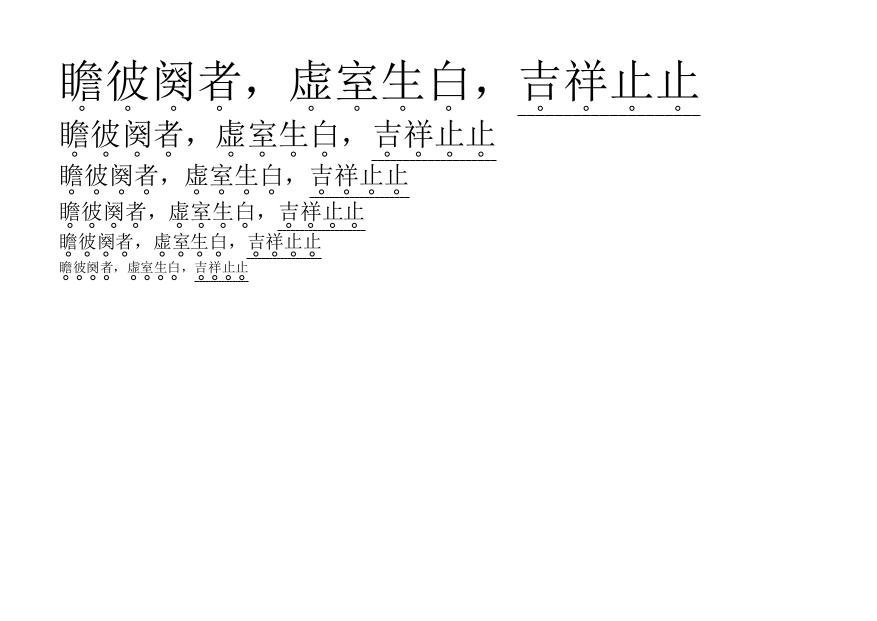
\documentclass[UTF8]{ctexart}
\usepackage{geometry,xeCJKfntef,tikz}
\geometry{papersize={14.85cm,10.5cm},margin=1cm}
\newcommand{\CJKundercircle}[1]{\CJKunderanysymbol[sep=0.1em]{0.2em}{\tikz\draw(0,0)circle(1pt);}{#1}}
\setlength{\parindent}{0pt}
\pagestyle{empty}
\begin{document}

\huge
\CJKundercircle{瞻彼阕者,虚室生白,\CJKunderline{吉祥止止}}

\Large
\CJKundercircle{瞻彼阕者,虚室生白,\CJKunderline{吉祥止止}}

\large
\CJKundercircle{瞻彼阕者,虚室生白,\CJKunderline{吉祥止止}}

\normalsize
\CJKundercircle{瞻彼阕者,虚室生白,\CJKunderline{吉祥止止}}

\small
\CJKundercircle{瞻彼阕者,虚室生白,\CJKunderline{吉祥止止}}

\scriptsize
\CJKundercircle{瞻彼阕者,虚室生白,\CJKunderline{吉祥止止}}

\end{document}

我更喜欢纯Tikz的画法。

\documentclass[border=2pt,tikz]{standalone}
\begin{document}
\begin{tikzpicture}
\fill [black] 
    (60:1cm) arc (120:240:1cm) 
             arc (0:120:1cm) 
             arc (-120:0:1cm) -- cycle;
\fill [black,rotate=60] 
    (60:1cm) arc (120:240:1cm) 
             arc (0:120:1cm) 
             arc (-120:0:1cm) -- cycle;
\end{tikzpicture}
\end{document}

感谢群友@香港-小狮子提出了一种较为简单的几何画法!其余参与讨论的大家,一并感谢您们的指导!
方法肯定不止这一种,后续我将继续整理讨论结果,同时十分欢迎提出新的回答!

\documentclass[tikz,border=2pt]{standalone}
\usetikzlibrary{calc,intersections}
\usepackage{amsmath}
\begin{document}
\begin{tikzpicture}[scale=2]

    \draw [->] (-3,0) -- (3,0) node [below left] {$x$};
    \draw [->] (0,-3) -- (0,3) node [below left] {$y$};
    \draw [help lines] (-3,-3) grid (3,3);
    \clip (-3.1,-3.1) rectangle (3.1,3.1);
    \draw [thick] (2,0) arc (0:360:2 and 1) node at (-2,-2) {$\dfrac{x^2}{4}+y^2=1$};

    \node (O) at (0,0) [below left] {$O$};
    \fill (1,2)                circle (1pt) coordinate (P)  node [above right] {$P(1,2)$};
    \fill ({-sqrt(3)*1cm},0cm) circle (1pt) coordinate (F1) node [below]       {$F_1$};
    \fill ({sqrt(3)*1cm},0cm)  circle (1pt) coordinate (F2) node [below]       {$F_2$};

    \path let \p1=($(P)-(F2)$),\n1={veclen(\x1,\y1)}
          in [dotted,name path=cirP] (P) circle (\n1);

    \path [dotted,name path=cirF1] (F1) circle (4);

    \path [name intersections={of=cirP and cirF1,by={J1,J2}},dashed] (J1)--(F2) (J2)--(F2);

    \draw let \p1=(J1),\p2=(F2),\n1={\y2-\y1},\n2={\x2-\x1},\n3={atan{\n1/\n2}-90}
          in [ultra thick,red] (P)--++(\n3:4cm);

    \draw let \p1=(J2),\p2=(F2),\n1={\y2-\y1},\n2={\x2-\x1},\n3={atan{\n1/\n2}-90}
          in [ultra thick,red] (P)--++(\n3:3cm);

\end{tikzpicture}
\end{document}

emmm

你的文档最主要的问题是 \textbf{...\\...} 有问题

建议用编辑器查找 \SetCell[r=4]{c} \textbf

全部替换为空,即删除

然后在 tblr<格式说明> 里的 rows={7mm, m, rowsep=1.0pt} 后面追加

,cell{1,5,9,13,17,21}{1}={r=4}{font=\bfseries}

发布
问题