这么提问是希望我们对着图片再打一遍代码吗 :)
这么提问是希望我们对着图片再打一遍代码吗 :)
align 和它的不带标号的版本 align* 可以排列多列对齐的公式,列与列之间用 & 分隔,而且在 & 左右的公式分别按照右对齐、左对齐的方式排列,所以很多人在用多个 & 时就从观感上容易产生很大的间距,相信这点你已经知道。在使用时,& 一般会放 = 的前面:
\documentclass{article}
\usepackage{amsmath}
\begin{document}
\begin{align*}
  x &= t & x &= \cos t & x &= t^2 \\
  y &= 2t & y &= \sin(t+1) & y &= e^t
\end{align*}
\end{document}
当然有时也可以放在二元运算符前面,只不过这时我通常会这么用(lshort-zh-cn 中也有类似的用法)
\documentclass{article}
\usepackage{amsmath}
\begin{document}
\begin{align*}
  (a+b)^2 ={}& a^2 + b^2\\
  & + 2ab
\end{align*}
\end{document}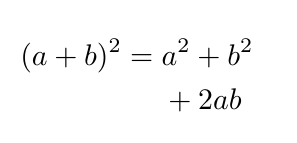
alignat 及不带标号的 alignat* 则不在列与列之间产生间距,但可以手工增加间距。alignat 环境有一个参数,表示每行要对齐的公式个数,每两列一组,如下面把列间距设定为一个 \quad 的距离
\documentclass{article}
\usepackage{amsmath}
\begin{document}
\begin{alignat*}{2}
  x &= \sin t & \quad & t \ge 0 \\
  y &= \cos t &       & t < 0
\end{alignat*}
\end{document}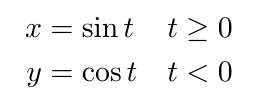
看第2行第3列我没用 \quad,但是间距依然保留下来,这是因为上一行的 \quad 位置必须在每一行都有所体现。它的这种特性就非常适合排版线性方程组
\documentclass{article}
\usepackage{amsmath}
\begin{document}
\begin{alignat*}{6}
  & x_1 & & + x_2 & & +x_3 & &+ x_4 & &+ x_5 & &=1 \\
  & x_1 & & & & +x_3 & & & & + x_5 & &=2 \\
  & & & \mathbin{\phantom{+}}x_2 & & & & +x_4 & & & &=3
\end{alignat*}
\end{document}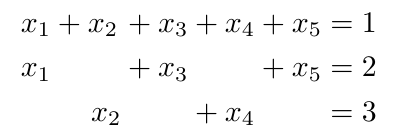
关于 \mathbin,可以参考 tex.stackexchange.com 的解释。\phantom 则是产生一个幻影。
可以考虑使用 wrpstuff 包处理图文混排,然后 tasks 包做题目的排版
biblatex 最好就用 biber,用 bibtex 的话,功能依旧受限。
不要用
\documentclass[mathserif]{beamer}换成
\documentclass{beamer}
\usefonttheme[onlymath]{serif}你大约是没读过手册。
\documentclass{article}
\usepackage{mathtools}
\begin{document}
\begin{equation*}
    \otimes
\end{equation*}
\end{document}还是下午的问题。你核心的地方是 \maketitle 出错而导致编译无法通过。你拿到这个模板之后,用一些有意义的单词来取代它模板原本的东西都好过直接用 * 来替换。
我现在把我改过的文本贴在这里。
%%
%% Copyright 2019-2021 Elsevier Ltd
%%
%% This file is part of the 'CAS Bundle'.
%% --------------------------------------
%%
%% It may be distributed under the conditions of the LaTeX Project Public
%% License, either version 1.2 of this license or (at your option) any
%% later version.  The latest version of this license is in
%%    http://www.latex-project.org/lppl.txt
%% and version 1.2 or later is part of all distributions of LaTeX
%% version 1999/12/01 or later.
%%
%% The list of all files belonging to the 'CAS Bundle' is
%% given in the file `manifest.txt'.
%%
%% Template article for cas-sc documentclass for
%% single column output.
\newtheorem{theorem}{Theorem}
\newtheorem{proposition}{Proposition}
%\newtheorem{assumption}{Assumption}
\newtheorem{definition}{Definition}
\newtheorem{lemma}{Lemma}
\newtheorem{corollary}{Corollary}
\newtheorem{fact}{Fact}
\newtheorem{conjecture}{Conjecture}
\newtheorem{as}{Assumption}
\newtheorem{ias}{IPC Assumption}
%\newcommand{\qed}{{\mbox{} \hspace*{\fill}{\vrule height5pt width4pt
%depth0pt}}\\}
\newcommand{\lqed}{{\mbox{} \hspace*{\fill}{\vrule height4pt width3pt
depth0pt}}}
\def\M{\hspace*{0.75em}}
\def\MM{\hspace*{2em}}
\def\MMM{\hspace*{2.25em}}
\def\MMMM{\hspace*{3em}}
\def\MMMMM{\hspace*{3.75em}}
\def\MMMMMM{\hspace*{4.5em}}

\documentclass[a4paper,fleqn]{cas-sc}

% If the frontmatter runs over more than one page
% use the longmktitle option.

%\documentclass[a4paper,fleqn,longmktitle]{cas-sc}

%\usepackage[numbers]{natbib}
%\usepackage[authoryear]{natbib}
\usepackage[authoryear,longnamesfirst]{natbib}

%%%Author macros
\def\tsc#1{\csdef{#1}{\textsc{\lowercase{#1}}\xspace}}
\tsc{WGM}
\tsc{QE}
%%%

% Uncomment and use as if needed
%\newtheorem{theorem}{Theorem}
%\newtheorem{lemma}[theorem]{Lemma}
%\newdefinition{rmk}{Remark}
%\newproof{pf}{Proof}
%\newproof{pot}{Proof of Theorem \ref{thm}}

\begin{document}
\let\WriteBookmarks\relax
\def\floatpagepagefraction{1}
\def\textpagefraction{.001}

% Short title
\shorttitle{This is an MWE}

% Short author
\shortauthors{Li, Tao}

% Main title of the paper
\title[mode = title]{one title}

% Title footnote mark
% eg: \tnotemark[1]
%\tnotemark[1]

% Title footnote 1.
% eg: \tnotetext[1]{Title footnote text}
%\tnotetext[1]{<tnote text>}

% First author
%
% Options: Use if required
% eg: \author[1,3]{Author Name}[type=editor,
%       style=chinese,
%       auid=000,
%       bioid=1,
%       prefix=Sir,
%       orcid=0000-0000-0000-0000,
%       facebook=<facebook id>,
%       twitter=<twitter id>,
%       linkedin=<linkedin id>,
%       gplus=<gplus id>]

\author[1]{author one}
%[type=editor,
      %style=chinese,
      %auid=000,
      %bioid=1,
      %prefix=Sir,
      %orcid=0000-0000-0000-0000,
      %facebook=<facebook id>,
      %twitter=<twitter id>,
      %linkedin=<linkedin id>,
      %gplus=<gplus id>]

% Corresponding author indication
\cormark[1]

% Footnote of the first author
\fnmark[1]

% Email id of the first author
\ead{}

% URL of the first author


% Credit authorship
% eg:
\credit{Conceptualization of this study, Methodology, Software}
%\credit{<Credit authorship details>}

% Address/affiliation
\affiliation[1]{organization={School of Management, Huazhong University of Technology and Science},
            addressline={Wu Han},
            postcode={430074},
            state={Hu Bei},
            country={China}}

\author[2]{author two}%[<options>]

% Footnote of the second author
\fnmark[2]

% Email id of the second author
%\ead{jjjh}

% URL of the second author
%\ead[url]{iijb}

% Credit authorship
%\credit{iuhb}

% Address/affiliation
\affiliation[2]{organization={Department of Industrial Engineering and Logistics Management, Hong Kong University of Science and Technology},
            addressline={Kowloon, Hong Kong}}


% Footnote text
%\fntext[1]{mmmm}

% For a title note without a number/mark
%\nonumnote{}

% Here goes the abstract
\begin{abstract}
   Well, now the abstract is to be continue, since the paper is unfinished. Later the authors will fill it.
\end{abstract}

% Use if graphical abstract is present
%\begin{graphicalabstract}
%\includegraphics{}
%\end{graphicalabstract}

% Research highlights
\begin{highlights}
  \item first.
  \item second.
\end{highlights}

% Keywords
% Each keyword is seperated by \sep
\begin{keywords}
  one word \sep another word
\end{keywords}

\maketitle

\section{Introduction}
% Main text
The previous researches(\citealt{Anand2020}) about pollution regulations mainly concentrated on its effects on firms, customers and social


We introduce the problem's setting in Section~\ref{formulation}.

\section{Mathematical Formulation}\label{formulation}
We consider

\begin{equation}\label{balance}
\sum_{i\in\overline S}x^0_i-\sum_{i\in \overline S}a_i=\sum_{i\in\overline S}(x^0_i-a_i)^+-\sum_{i\in\overline S}(a_i-x^0_i)^+=0.
\end{equation}

 We denote $\tilde X^0(p)$ as the set of $x^0$  that satisfies Eq. (\ref{balance})

% To print the credit authorship contribution details
\printcredits


\bibliographystyle{nonumber}

\begin{thebibliography}{}
\bibitem[Anand and Giraud-Carrier (2020)]{Anand2020}
Anand K S , Giraud-Carrier F C. 2020. Pollution Regulation of Competitive Markets. {\em Management Science}, {\bf 66(9)}, 3799-4358.


\end{thebibliography}

%% Loading bibliography style file
%\bibliographystyle{model1-num-names}
%\bibliographystyle{cas-model2-names}

% Loading bibliography database
%\bibliography{}

% Biography
%\bio{}
% Here goes the biography details.
%\endbio

%\bio{pic1}
% Here goes the biography details.
%\endbio

\end{document}
应该用它就可以编译过了。编译命令是
latexmk -pdf -synctex=1 mwe.tex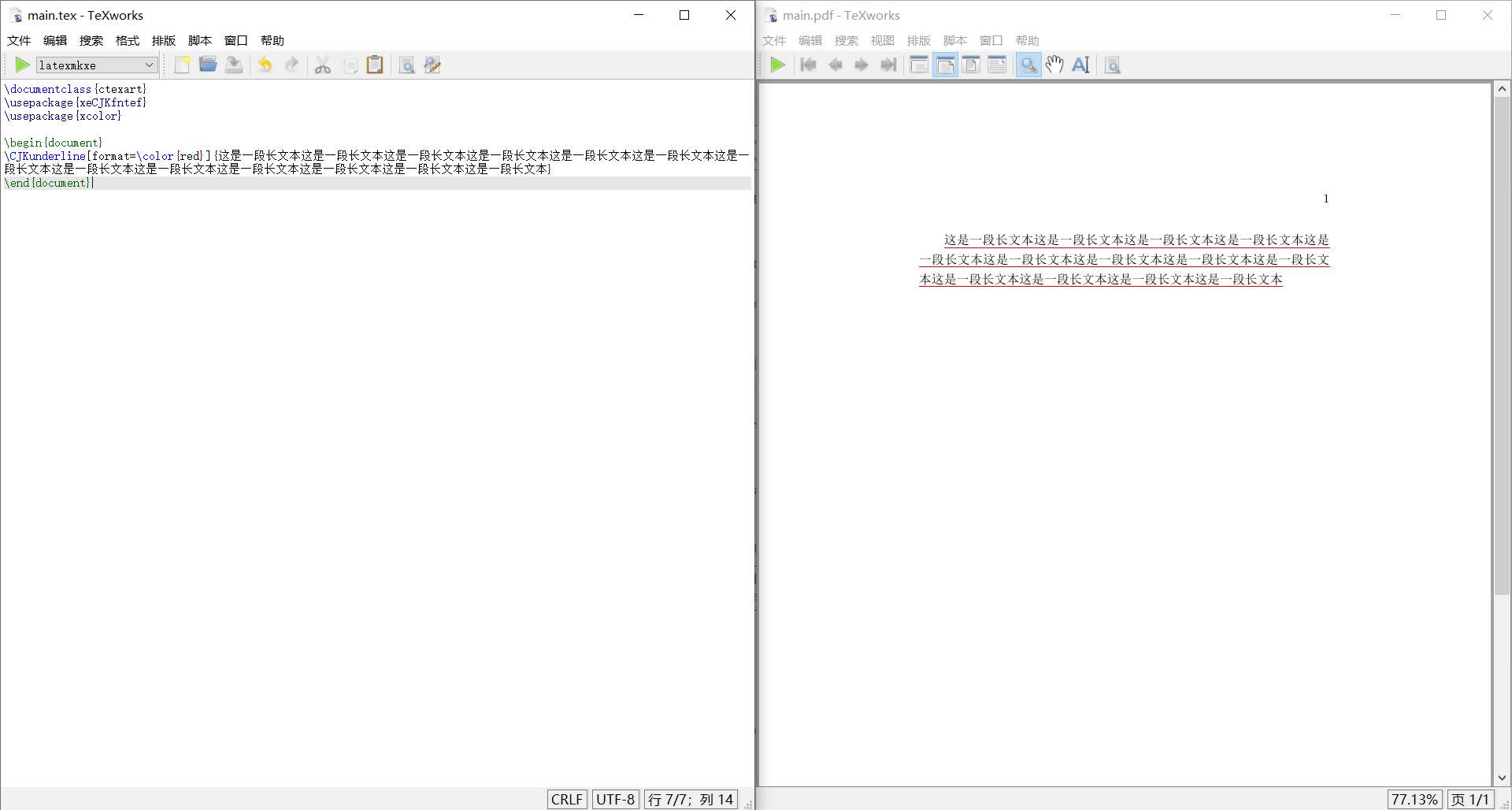
\documentclass{ctexart}
\usepackage{xeCJKfntef}
\usepackage{xcolor}

\begin{document}
\CJKunderline[format=\color{red}]{这是一段长文本这是一段长文本这是一段长文本这是一段长文本这是一段长文本这是一段长文本这是一段长文本这是一段长文本这是一段长文本这是一段长文本这是一段长文本这是一段长文本这是一段长文本}
\end{document}在章的首页不出现页眉、页脚是通例了,没什么好大惊小怪的。
至于你说的第一个问题,或许是因为章标题的设置造成的?这个以往没有怎么追究过。
你的代码……嗯……一言难尽……推荐多写些基础的东西,好好练练。

问 插图不能在正文中插入