关注者
0
被浏览
2k

\documentclass{standalone}
\usepackage[3d]{luadraw}
\usepackage[svgnames]{xcolor}
\begin{document}

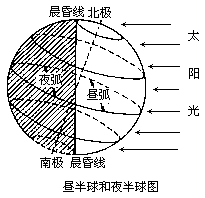
    \pgfdeclareradialshading[]{sphereDay}{\pgfpoint{20 bp}{0 bp}}
    {color(0bp)=(orange!10); color(20bp)=(orange!50); color(38bp)=(orange)}%
    \pgfdeclareradialshading[]{sphereNight}{\pgfpoint{50 bp}{0 bp}}
    {color(0bp)=(DarkBlue!10); color(15bp)=(DarkBlue!70); color(38bp)=(black)}%

    \begin{luadraw}{name=earth_light_half}
        local g = graph3d:new{
            window3d={-5, 5, -5, 5, -5, 5},
            window={-5 , 10, -5 ,5},
            size={8, 8},viewdir={90, 80}
        }

        require "luadraw_spherical"
        local O, R = Origin, 4
        Hiddenlines = true
        Hiddenlinestyle = "dashed"
        g:Define_sphere({radius=R, show=false})
        local thetaA, thetaB = 22.5, 67.5
        -- plot the latitudes
        for _,i in ipairs({90-thetaA, 90-thetaB, 90+thetaA, 90+thetaB})do
            local lat = sM(0,i)
            g:DScircle({lat,vecK}, {color="magenta", width=4})
        end
        -- plot the equator
        g:DSbigcircle({vecI,vecJ},{style="dashed", color="teal", width=5})
        -- plot the axis
        g:DSseg({ M(0,0,-1.25*R), M(0,0,1.25*R) }, {width=10})
        -- two hemispheres outlines
        local A, B = Z(0,R), Z(0,-R)
        g:Dpath({ B, "m", 0, A, R, -1, "ca"}, "color=DarkGray, shading=sphereNight")
        g:Dpath({ B, "m", 0, A, R, 1, "ca"}, "color=DarkGray, shading=sphereDay")

        g:Rotate3d(-22.5, {Origin,vecJ})
        g:Dspherical()

        local dt = 25*deg
        for k = 0, 4 do
            local z = Zp(R+1,(k-2)*dt)
            g:Dpolyline({Z(10,z.im), z}, false, "-latex,thick,teal")
        end
        g:Show()
    \end{luadraw}
\end{document}




手机
浏览

Does it really work(?)
感觉要加上自定义的框和线都有一定的难度...可拓展性不太够啊... OP也没有给出答案...