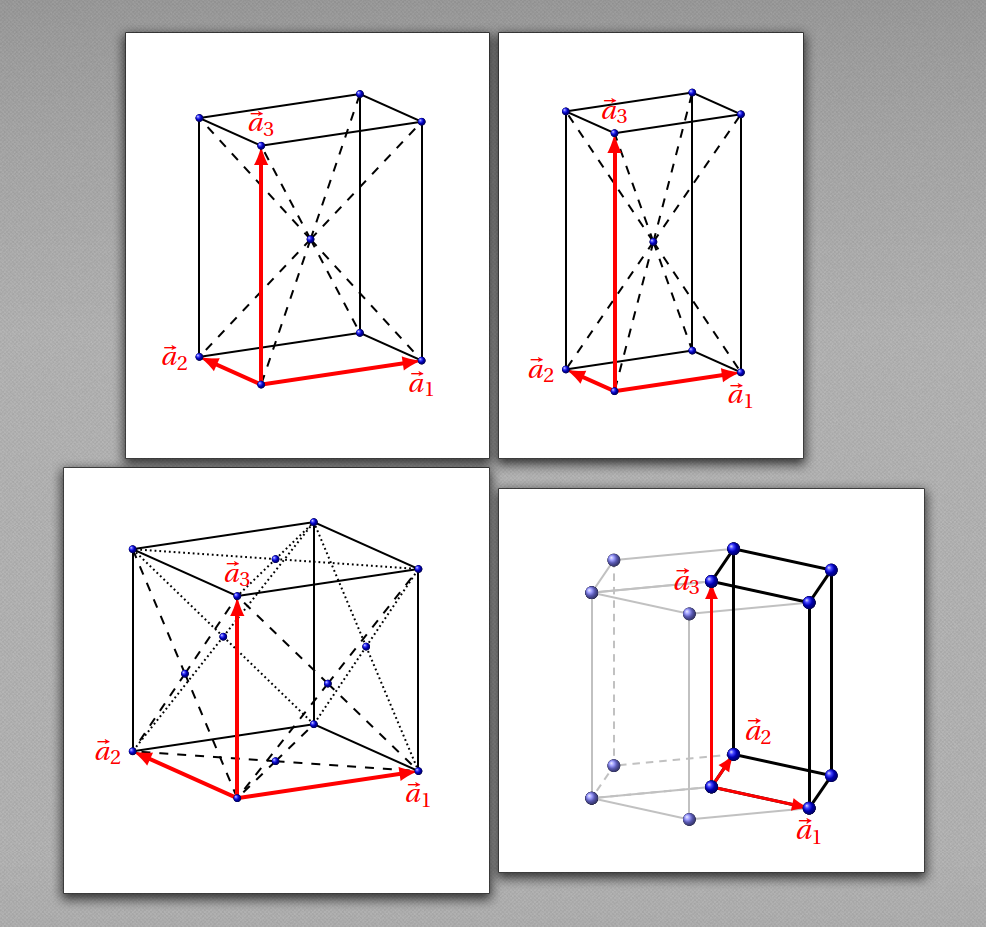
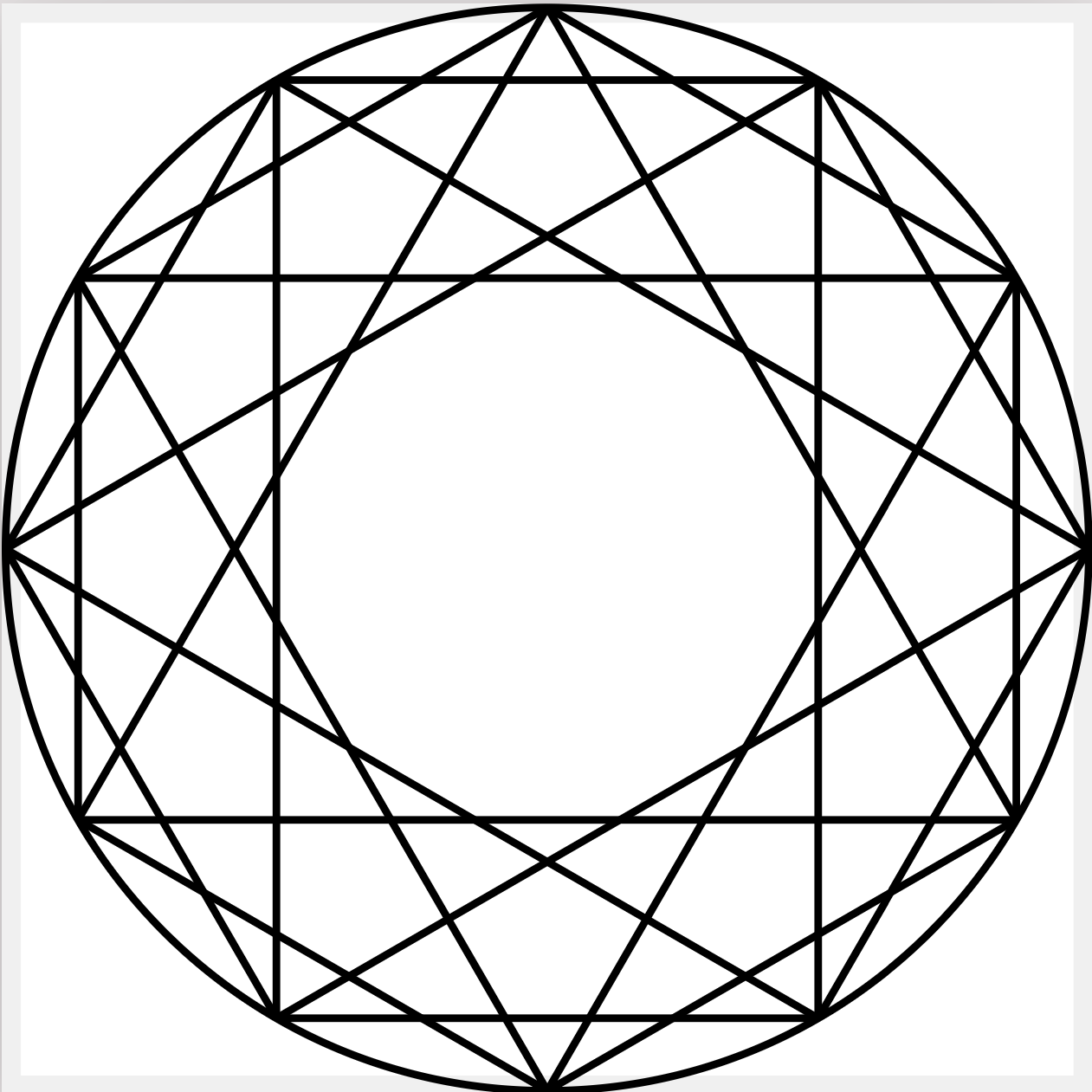
请问如何使用TIKZ绘制这样的图片呀?
发布于 2024-06-30 21:18:32
如题,请问如何使用TiKZ绘制这样的图片呀,我试了问GPT-4o,但是给出的结果好像不还合理。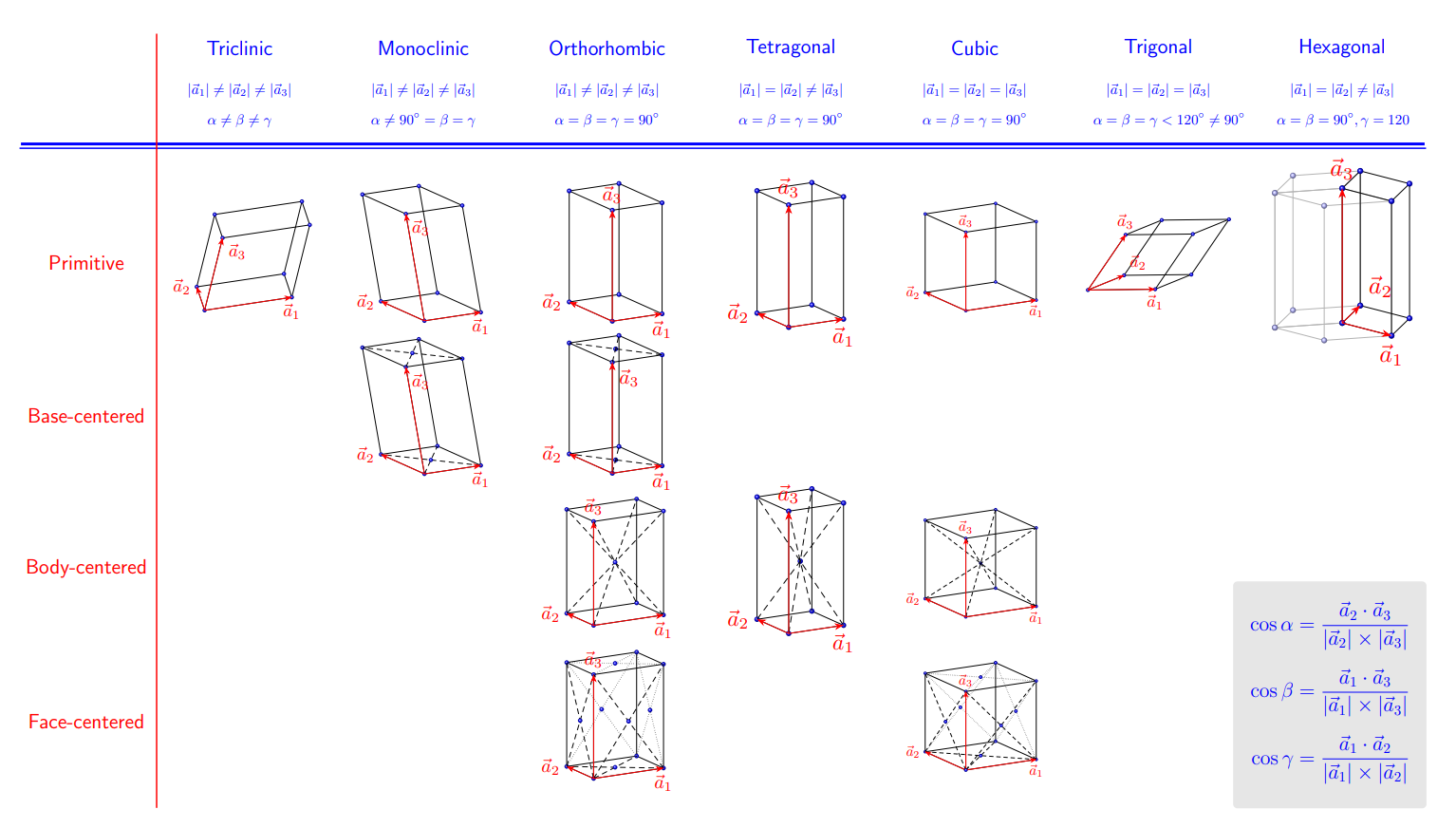
GPT4给出的结果如下:
\documentclass{standalone}
\usepackage{tikz}
\usepackage{tikz-3dplot}

\begin{document}

\newcommand{\crystalCell}[5]{ % #1: 晶胞类型, #2: 晶格参数, #3: 特殊晶格点, #4: x 偏移, #5: y 偏移
    \begin{scope}[shift={(#4,#5)}]
        \tdplotsetmaincoords{70}{110}
        \begin{scope}[tdplot_main_coords]
            % 晶格向量
            \draw[red,thick,->] (0,0,0) -- (1,0,0) node[below] {$\vec{a}_1$};
            \draw[red,thick,->] (0,0,0) -- (0,1,0) node[left]  {$\vec{a}_2$};
            \draw[red,thick,->] (0,0,0) -- (0,0,1) node[above] {$\vec{a}_3$};
            % 晶胞
            \draw (0,0,0) -- (1,0,0) -- (1,1,0) -- (0,1,0) -- cycle;
            \draw (0,0,1) -- (1,0,1) -- (1,1,1) -- (0,1,1) -- cycle;
            \draw (0,0,0) -- (0,0,1);
            \draw (1,0,0) -- (1,0,1);
            \draw (1,1,0) -- (1,1,1);
            \draw (0,1,0) -- (0,1,1);
            % 晶格点
            \foreach \x in {0,1} {
                \foreach \y in {0,1} {
                    \foreach \z in {0,1} {
                        \filldraw[blue] (\x,\y,\z) circle (2pt);
                    }
                }
            }
            % 特殊晶格点
            #3
            % 晶胞参数
            \node[above right] at (1,0,0) {#2};
            % 晶胞类型
            \node[font=\bfseries, below right] at (0,0,0) {#1};
        \end{scope}
    \end{scope}
}

\begin{tikzpicture}

% Triclinic
\crystalCell{Primitive}{}{}{0}{0}

% Monoclinic
\crystalCell{Primitive}{}{(1,0,1)}{3}{0}
\crystalCell{Base-centered}{}{(0.5,0.5,0)}{3}{-3}

% Orthorhombic
\crystalCell{Primitive}{}{}{6}{0}
\crystalCell{Base-centered}{}{(0.5,0.5,0)}{6}{-3}

% Tetragonal
\crystalCell{Primitive}{}{}{9}{0}
\crystalCell{Base-centered}{}{(0.5,0.5,0)}{9}{-3}

% Cubic
\crystalCell{Primitive}{}{}{0}{-6}

% Trigonal
\crystalCell{Primitive}{
    \draw (0,0,0) -- (1,1,0);
    \draw (0,0,1) -- (1,1,1);
    \filldraw[blue] (0.5,0.5,0) circle (2pt);
    \filldraw[blue] (0.5,0.5,1) circle (2pt);
}{(0.5,0.5,0)}{3}{-6}

% Hexagonal
\crystalCell{Primitive}{
    \draw[gray!50] (0.5,0,0) -- (1.5,0,0) -- (1.5,0,1) -- (0.5,0,1) -- cycle;
    \draw[gray!50] (0.5,0,0) -- (0,0.866,0) -- (1,0.866,0) -- (1.5,0,0);
    \draw[gray!50] (0.5,0,1) -- (0,0.866,1) -- (1,0.866,1) -- (1.5,0,1);
    \filldraw[blue!50] (0.5,0,0) circle (2pt);
    \filldraw[blue!50] (1.5,0,0) circle (2pt);
    \filldraw[blue!50] (1.5,0,1) circle (2pt);
    \filldraw[blue!50] (0.5,0,1) circle (2pt);
    \filldraw[blue!50] (0,0.866,0) circle (2pt);
    \filldraw[blue!50] (1,0.866,0) circle (2pt);
    \filldraw[blue!50] (0,0.866,1) circle (2pt);
    \filldraw[blue!50] (1,0.866,1) circle (2pt);
}{}{6}{-6}

% 添加晶系名称和参数
\foreach \x/\name/\params in {
    0/Triclinic/{
        $|\vec{a}_1| \neq |\vec{a}_2| \neq |\vec{a}_3|$,
        $\alpha \neq \beta \neq \gamma$
    },
    3/Monoclinic/{
        $|\vec{a}_1| \neq |\vec{a}_2| \neq |\vec{a}_3|$,
        $\alpha \neq 90^\circ = \beta = \gamma$
    },
    6/Orthorhombic/{
        $|\vec{a}_1| \neq |\vec{a}_2| \neq |\vec{a}_3|$,
        $\alpha = \beta = \gamma = 90^\circ$
    },
    9/Tetragonal/{
        $|\vec{a}_1| = |\vec{a}_2| \neq |\vec{a}_3|$,
        $\alpha = \beta = \gamma = 90^\circ$
    },
    0/Cubic/{
        $|\vec{a}_1| = |\vec{a}_2| = |\vec{a}_3|$,
        $\alpha = \beta = \gamma = 90^\circ$
    },
    3/Trigonal/{
        $|\vec{a}_1| = |\vec{a}_2| = |\vec{a}_3|$,
        $\alpha = \beta = \gamma < 120^\circ \neq 90^\circ$
    },
    6/Hexagonal/{
        $|\vec{a}_1| = |\vec{a}_2| \neq |\vec{a}_3|$,
        $\alpha = \beta = 90^\circ, \gamma = 120^\circ$
    }
} {
    \node[font=\bfseries, above] at (\x+1.5,0.5) {\name};
    \node[below, align=center] at (\x+1.5,0) {\params};
}

\end{tikzpicture}

\end{document}
但是需要将以下部分注释才能正常编译:
% Trigonal
\crystalCell{Primitive}{
    \draw (0,0,0) -- (1,1,0);
    \draw (0,0,1) -- (1,1,1);
    \filldraw[blue] (0.5,0.5,0) circle (2pt);
    \filldraw[blue] (0.5,0.5,1) circle (2pt);
}{(0.5,0.5,0)}{3}{-6}

% Hexagonal
\crystalCell{Primitive}{
    \draw[gray!50] (0.5,0,0) -- (1.5,0,0) -- (1.5,0,1) -- (0.5,0,1) -- cycle;
    \draw[gray!50] (0.5,0,0) -- (0,0.866,0) -- (1,0.866,0) -- (1.5,0,0);
    \draw[gray!50] (0.5,0,1) -- (0,0.866,1) -- (1,0.866,1) -- (1.5,0,1);
    \filldraw[blue!50] (0.5,0,0) circle (2pt);
    \filldraw[blue!50] (1.5,0,0) circle (2pt);
    \filldraw[blue!50] (1.5,0,1) circle (2pt);
    \filldraw[blue!50] (0.5,0,1) circle (2pt);
    \filldraw[blue!50] (0,0.866,0) circle (2pt);
    \filldraw[blue!50] (1,0.866,0) circle (2pt);
    \filldraw[blue!50] (0,0.866,1) circle (2pt);
    \filldraw[blue!50] (1,0.866,1) circle (2pt);
}{}{6}{-6}
得到的结果如下: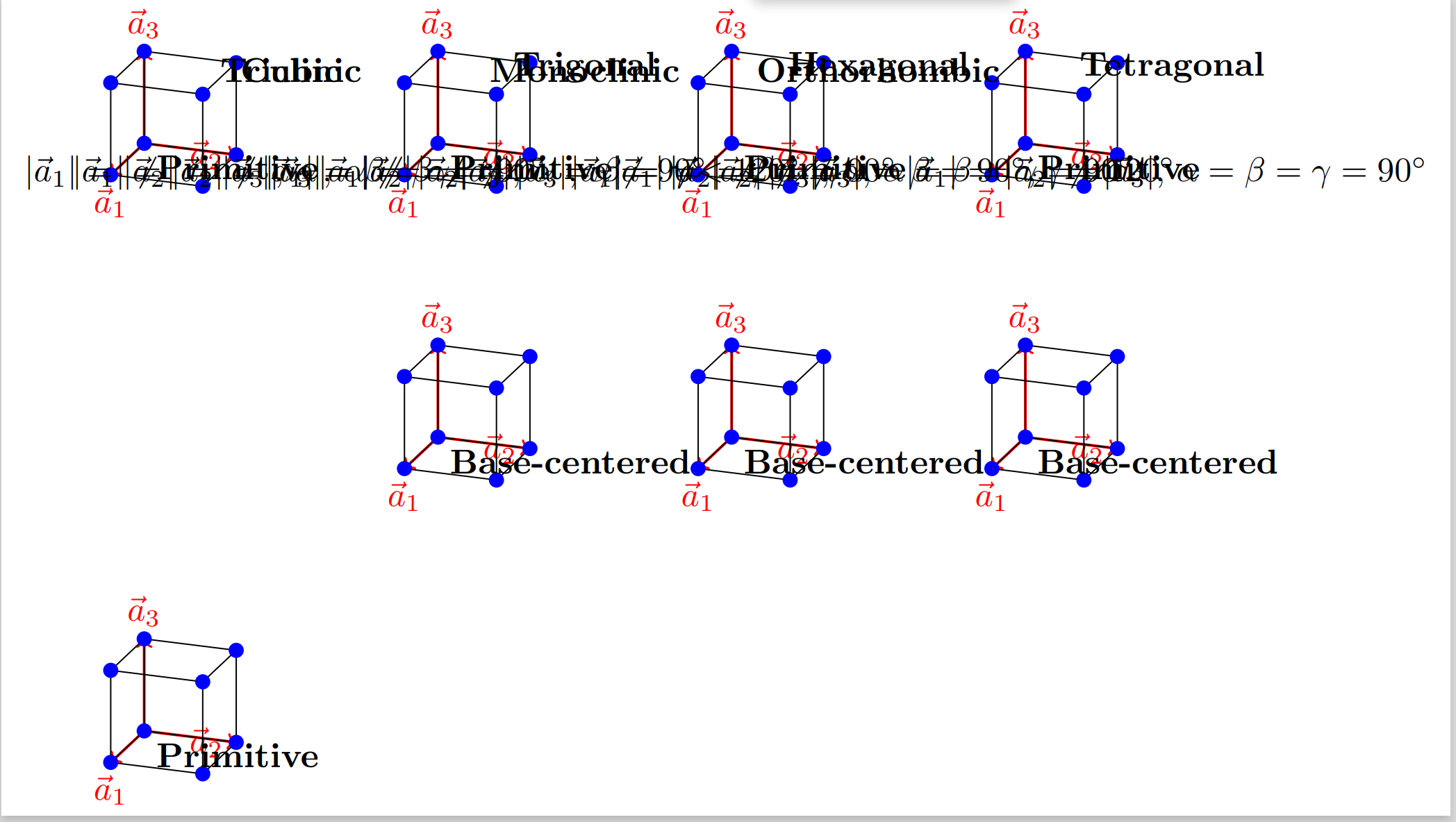
希望各位大佬指点
关注者
0
被浏览
2k